Your wedding. Every guest moment in one place.
Guest photos land in your private gallery by QR code. Challenges, approvals, and export keep every perspective together.
Why the Fotospiel App fits this event
Every event has its own priorities, from easy participation to beautiful memories and full control.
- Guests open the Fotospiel App directly in the browser
- Photo challenges create spontaneous group shots and small favourite moments
- The gallery stays private and easy to moderate
- Everything remains exportable in one place after the wedding
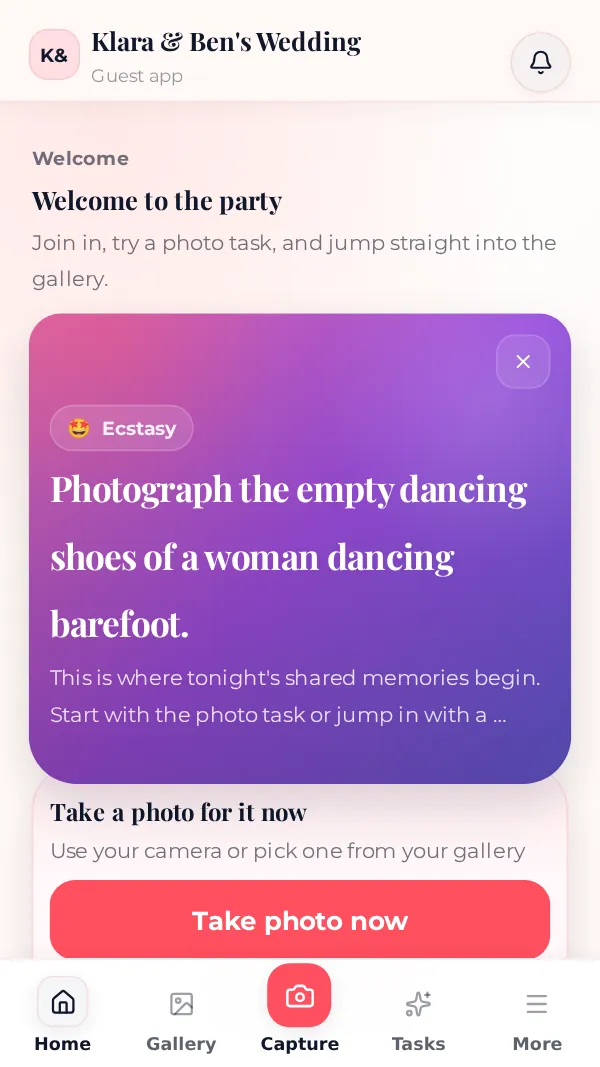
Real screens from our demo events. The photos in them are AI-generated.
More real moments
- Ideal when you want more than just professional couple portraits
- Helps witnesses and friends get guests actively involved
- Works with QR cards on tables or in invitations
How to really get every guest photo from your wedding
Most couples receive only a fraction of the pictures their guests took. It is rarely unwillingness – it is missing prompts and too many steps. These points make the difference in practice.
Before the wedding
Create the event, upload two or three photos of your own as examples and test the QR code on an iPhone and an Android phone. If you like, print the code on the invitation so that pictures from the hen or stag party and the journey end up in the same gallery.
During the ceremony
Ask guests to keep their phones down during the ceremony. Your photographer needs a clear view and guests enjoy the moment. The gallery starts afterwards at the drinks reception – one sentence from your witnesses is enough.
At dinner and in the evening
A sign on every table and photo tasks produce shots no photographer captures: conversations at the next table, grandparents, children, the dance floor. A live slideshow late in the evening shows guests that their pictures arrive, and they upload more.
After the party
Approve pictures, remove anything that should not be shared and download everything as a ZIP. Then share the gallery link with all guests – many will see the day from other angles for the first time.
Questions about Wedding
Here are the most important questions and answers for this type of event.
Do our guests need an account?
No. Guests scan the QR code and use the Fotospiel App directly in the mobile browser.
Will this interrupt the wedding flow?
Not if the entry stays visible and simple. A QR card on each table and a few clear prompts are usually enough.
Can awkward photos stay hidden?
Yes. With approval mode and moderation, you decide which photos become visible.
How do we prepare the gallery?
Create your event, choose a package and test guest access with a photo of your own. Then share the event link or print the QR code for your tables. Guests need neither an app installation nor an account.
What happens with poor reception?
Uploads are stored locally on the device and synchronised automatically when a connection becomes available again. Test the flow at your venue beforehand. Keep pending photos on the device until the upload has finished.
How long are our photos available?
Depending on the package, the gallery stays online for 6 months (Starter), 1 year (Classic) or 2 years (Premium). The period starts on the wedding day, or the last day of a multi-day celebration, not on the day you buy. After that the photos are deleted, so download them in time.
How do we keep our photos after the celebration?
Mark your highlights and download all pictures together as a ZIP. With Classic and Premium, photos arrive in full resolution; in the Starter package they are optimised to at most 2,560 pixels on upload – enough for the gallery, slideshow and photo book. Keep the export in a place of your own as well.
How much does the Fotospiel App cost for a wedding?
You pay once per event, no subscription: Starter €29, Classic €59, Premium €119. Classic is enough for most weddings. Before buying you can try the guest view for free in the demo.
Can we include a photo booth or our photographer?
A photo booth, yes: with Photobooth Connect its pictures land in the same gallery automatically on Windows, macOS or Linux. Your photographer can upload individual pictures like a guest via the event link. Their full gallery still comes directly from them as usual.
Try the Fotospiel App for your event
The demo shows the browser entry from the guest perspective and helps you choose the right package.
Your celebration
Demo event
Table1

Scan with your phoneThe demo opens instantly